
*Disclaimer: due to confidentiality agreements, I have not shared any classified information, screenshots, or documentation. All media has been recreated from scratch.
U.S. State Government Chatbots
In mid 2025, a U.S. state government contracted CDI to supplement their ambitious project to build a bespoke RAG chatbot for most government agencies (a total of 25 bots).
As most people in this industry may understand, this is an immense undertaking, especially with the dire need of accuracy and the risk of using a relatively new technology.
I determined that we faced three main challenges:
Content and knowledge base readiness
Long-term regression testing enormity
Scalable prompting across agencies
Challenge #1: Content
The project leaders decided early on to use the agencies’ websites as the bots’ knowledge base.
Pros:
Saved content authors time by using pre‑existing content
Enabled immediate prototyping
Cons:
Content was written for web users, not necessarily RAG‑ready
Large volumes of varied media for the bot to ingest
Limited ability to apply metadata tagging due to scope (hundreds of thousands of pages)

Strategy
RAG bots are quite good at retrieving and generating content, but when the knowledge base is disorganized, performance will suffer. Some stakeholders believed that most problems could be solved through prompting, but I deemed this untenable long term. It was my job to educate each agency on the importance of a content‑first approach.
Introduce structured content strategies through multiple teaching sessions
Prioritize anticipated high‑traffic content
Delegate content‑driven golden‑dataset testing to content authors to self‑diagnose content issues
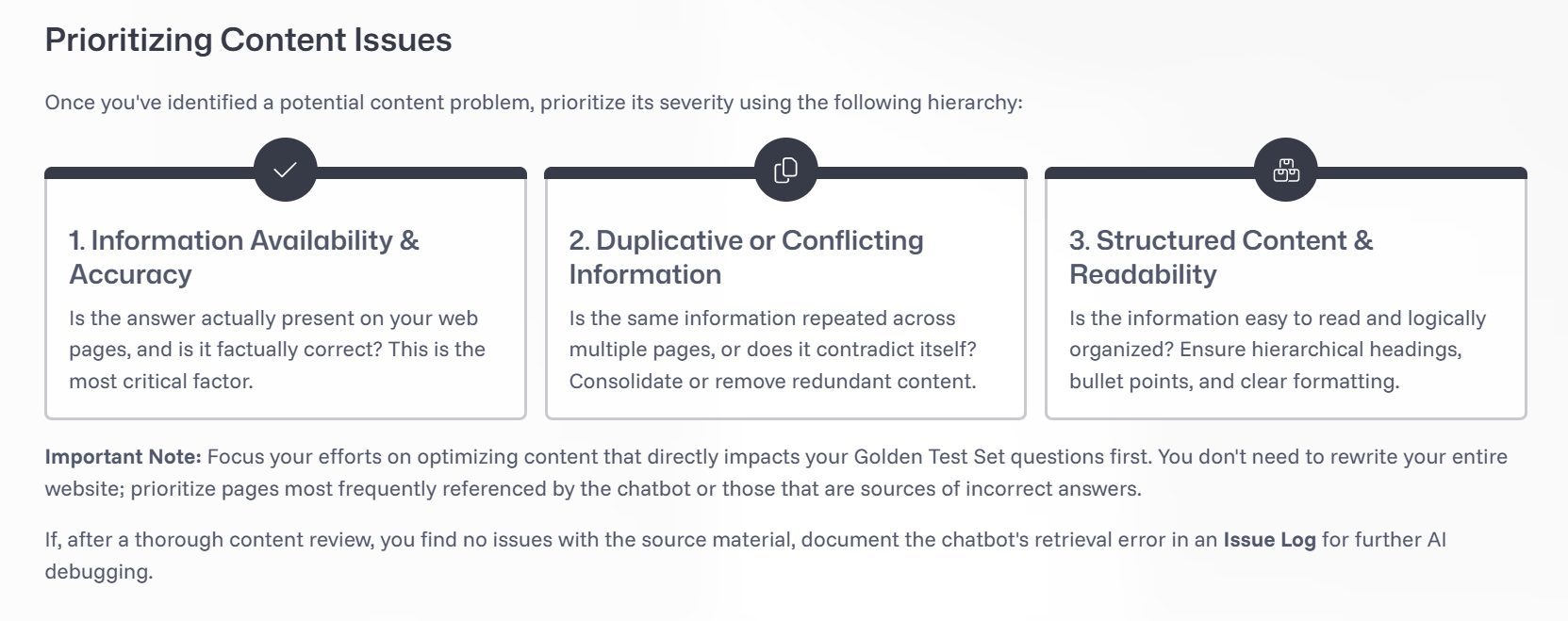
I’ve included an example of how to triage content issues that I taught the agencies.
Results: Since adopting this content-first approach, we’ve seen agencies go from 40% accuracy to up to 100% accuracy. Agency leaders report that this exercise has not only improved their websites for the bot; it has also opened their eyes to content gaps that needed to be filled for web-users.
Challenge #2: Regression Testing
Because government agencies need absolute accuracy from the bot, this posed an increased challenge for regression testing:
Agencies were testing anything and everything they could think of, not necessarily from an end‑user perspective, resulting in thousands of test cases.
Agencies did not initially understand that automated regression testing works differently for RAG than for declarative bots because the answer may differ each time.
Updating prompts can be like adding salt to a dish: you can go too far and ruin the whole thing, which mandates a “taste test” for any prospective global update across the bots.
The dev team was overwhelmed by hundreds of issue‑log reports from agencies that were actually content issues or extremely niche cases unlikely to occur in production.
Strategy
I implemented the following requirements to rein in the project scope:
Each agency creates its own golden test set based on expected top inquiries. Testing for accuracy will be done by business area SMEs. Non-content issues will be reported to the dev team.
Depending on the size of the agency, the number of test questions may range from 80–250 (still quite a lot, but government accuracy is king here).
Within these questions, 10–15% may be marked as “critical,” defined as unfathomable to launch if the question fails.
Go‑live requirements: 100% pass rate for critical questions; 85% pass rate for non‑critical; no major hallucinations or safeguard concerns.
Functional testing for conversational elements, jailbreaks, general safeguards, and technical requirements will be handled by the dev and design teams.
Results: After instituting golden test sets, agencies have been able to focus their testing and make content updates where they’re needed most. Several agencies have said they’re “pleasantly surprised” by the bot’s accuracy. As of mid‑2026, most agencies are still in the testing phase, but some have already reached 100% accuracy for both critical and non‑critical questions!
Challenge #3: Scalable Prompting
With 25 bots on our hands, it didn’t make sense to reinvent the wheel for every bot when it came to system prompts. However, each department needed agency‑specific instructions, safeguard configurations, persona tweaks, and bespoke flows. Additionally, the documentation behind every change needed to be organized in some sort of change log. Basically, we needed to figure out how to juggle.

Strategy
To make the workload manageable now and in the future, we implemented the following processes:
Designed an ADO Wiki to serve as a change log for global and agency‑specific updates
Instituted a branching strategy through GitHub
Created a global version of the bot that could push universal updates to all bots automatically
Additionally, during the course of this project, I created a design checklist of all decision points that can (and in my opinion, should) be made before a bot is ever created. In the new world of AI, most of the design work has shifted toward making intentional, thoughtful decisions about the bot’s future behavior.
The following is a sample of that checklist. (Feel free to reach out if you’re curious about the rest!)
Rachel’s RAG Design Checklist
Persona, Goals, and User Definition
1
Persona Definition Define who the bot is, its role, boundaries, and what it is not allowed to be.
Voice & Tone Guidelines Specify tone defaults and contextual shifts (e.g., error states, escalations, sensitive topics).
Bot Goals (Operationalized) Translate business goals into conversational priorities and decision rules.
In‑Scope vs Out‑of‑Scope Tasks List what the bot will handle and what it must decline or redirect.
User Archetypes Identify primary user types, their expertise levels, and expectations.
Critical Use Case List Identify mission-critical use cases that must be included in the build
Conversation Patterns & Interaction Design
2
Core Interaction Behaviors
Fallback Handling Define patterns for low‑confidence answers, retrieval failures, or unclear queries.
Disambiguation Handling Specify when and how the bot asks clarifying questions, with examples.
Chit Chat Handling Determine how much small talk is allowed and how the bot pivots back to task.
Multi‑Turn Handling Define how context is carried, referenced, or reset across turns.
Onboarding Flow Design the first‑time user introduction and expectation‑setting.
Offboarding / Session Closure Define how conversations end and whether summaries or next steps are offered.
Standard Vocabulary List examples of common phrases or words that bot will use vs. examples of what it should not do
Safety, Escalation, and Guardrails
Safeguard Response Handling Define patterns for sensitive categories (self‑harm, hate, medical, legal, etc.).
Live Agent Escalation Specify when escalation is triggered, how it’s phrased, and what the user sees.
Red‑Line Behaviors Explicitly list behaviors the bot must never perform (fabrication of legal citations, impersonation, etc.).
Uncertainty & Confidence Communication Define how the bot expresses uncertainty without undermining trust.
Retrieval, Reasoning, and Tooling Behavior
3
Retrieval & Knowledge Use
Source‑of‑Truth Hierarchy
Define which repositories are authoritative and how conflicts are resolved.Relevance Assessment Rules
Specify what counts as “relevant enough” and when to say “I don’t know.”Freshness & Versioning Behavior
Decide how the bot handles outdated content and whether it surfaces timestamps.Citation & Attribution Rules
Define when to show sources, how many, and in what format.
Prompting & Tool Orchestration
Retrieval vs Summarization Prompts
Define prompt patterns for each tool and when each is used.Tool Selection Logic
Describe in plain language when the bot should retrieve, summarize, call a tool, or ask the user for more info.Error & Degradation Behavior
Define user‑facing behavior when tools fail, time out, or return partial data.
Output Quality, Formatting, and UX
4
Readability & Structure
Formatting & Readability Guidelines
Define bullets vs paragraphs, tables, code blocks, length constraints, and adaptive formatting rules.URL Display Handling
Specify when URLs appear, how they’re labeled, and how to avoid overwhelming users.Accessibility Guidelines
Define constraints for screen readers, jargon avoidance, and alternative descriptions for complex content.Inclusive Language Rules
Ensure tone and phrasing remain respectful, neutral, and accessible across audiences.